개요
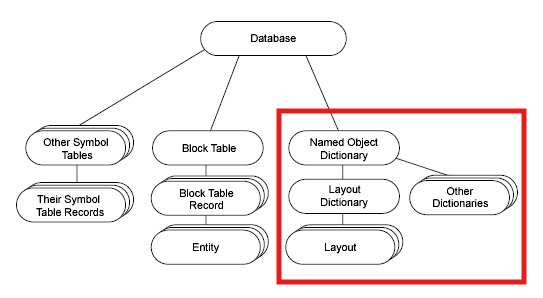
딕셔너리는 데이터베이스에 저장되는 확장된 데이터 영역으로서 오토캐드가 기본적으로 제공하는 12개의 딕셔너리가 있다. 대표적으로 그룹 정보를 저장하는 Group Dictionary와 Paper Space의 Layout 정보를 저장하는 Layout Dictionary 그리고 MLine의 스타일 정보를 저장하는 MLine Style Dictionary 등이 있다. 특히, 명명된 객체 사전(Named Object Dictionary)은 AcDbObject로 부터 상속 받은 사용자 정의 객체를 정의할 수 있기 때문에 오토캐드 데이터베이스에 의미 있는 데이터를 클래스 형태로 저장할 수 있다.
또한, 위 그림의 빨간색 박스에 알 수 있듯이 Named Object Dictionary는 오토캐드가 기본적으로 제공하는 11개의 딕셔너리를 저장하고 있고, 사용자 정의 객체를 만들어 새로운 이름의 Entry로 Dictionary를 만들 수 있다. 다음은 오토캐드가 기본적으로 제공해 주는 Dictionary와 사용자 정의 사전을 저장할 수 있는 명명된 객체 사전의 나열이다.
- Named Object Dictionary
- MLineStyle Dictionary
- Group Dictionary
- Layout Dictionary
- PlotStyle Dictionary
- PlotSettings Dictionary
- Color Dictionary
- Material Dictionary
- VisualStyle Dictionary
- TableStyle Dictionary
- ScaleList Dictionary
- MLeaderStyle Dictionary
새로운 딕셔너리
새로운 딕셔너리를 생성하려면 AcDbDictionary 인스턴스를 생성하고, 이를 데이터베이스에 추가한 다음, 소유자 객체에 등록 해야한다. 즉, setAt() 함수를 사용하여 객체를 딕셔너리와 데이터베이스에 추가한다.
setAt() 함수는 AcDbObject로 부터 상속 받은 사용자 정의 객체를 엔트리 이름과 함께 추가한다. 엔트리 이름이 이미 존재하는 경우, 최신 값으로 대체된다.
☆ 중요 ☆
딕셔너리에 항목을 추가하면 딕셔너리는 자동으로 해당 항목에 Reactor(리엑터)를 연결한다. 딕셔너리에 등록된 객체가 삭제되면 딕셔너리는 알림을 받고 해당 객체를 딕셔너리에서 제거 한다.
Group 딕셔너리
그룹은 데이터베이스 엔티티의 정렬된 컬렉션을 유지하는 컨테이너 객체다. 그룹은 이름이 명명된 Persistent 선택 집합으로 생각할 수 있다. 그룹은 포함된 엔티티에 대한 소유권 링크를 갖지 않다.
엔티티가 삭제되면 해당 엔티티를 포함하는 그룹에서 자동으로 제거된다. 엔티티가 복구되면 그룹에 자동으로 다시 삽입된다. 위에서 언급했듯이, 딕셔너리도 하나의 Transaction 그룹에 묶여, Undo/Redo History에 기록되고 동작한다.
AcDbGroup::newIterator() 함수를 사용하여 이터레이터를 얻고 그룹 내 엔티티를 순회할 수 있다. AcDbGroup 클래스는 그룹에 엔티티를 추가하거나 추가하는 함수, 그룹 내 특정 인덱스에 엔티티를 삽입하는 함수, 엔티티를 제거하는 함수, 그룹 내 한 위치에서 다른 위치로 엔티티를 이동하는 함수를 제공한다.
또한 AcDbGroup 클래스의 setColor(), setLayer(), setLinetype(), setVisibility(), setHighlight() 함수를 사용하여 그룹의 모든 멤버에 속성을 할당할 수 있다. 이러한 작업은 그룹 내 각 엔티티를 열고 속성을 직접 설정하는 것과 동일한 효과를 나타낸다. 그룹은 항상 GROUP 딕셔너리에 저장되어야 하며, 해당 딕셔너리는 다음과 같이 얻을 수 있다.
AcDbDictionary* pGrpDict = acdbHostApplicationServices()->working Database()->
        getGroupDictionary(pGroupDict, AcDb::kForWrite);
그룹 사전을 얻는 또 다른 방법은 명명된 객체 사전에서 "ACAD_GROUP"을 찾는 것이다.
다음 함수들은 사용자가 먼저 "ASDK_GROUPTEST"라는 그룹에 포함될 엔티티를 선택하도록 요청하는 애플리케이션의 일부이다. 그런 다음 removeAllButLines() 함수를 호출하여 그룹을 순회하며 선이 아닌 모든 엔티티를 제거한다. 마지막으로 그룹에 남아 있는 엔티티들을 빨간색으로 변경한다.
void groups()
{
    AcDbGroup *pGroup = new AcDbGroup("grouptest");
    AcDbDictionary *pGroupDict;
    acdbHostApplicationServices()->workingDatabase()
        ->getGroupDictionary(pGroupDict, AcDb::kForWrite);
    AcDbObjectId groupId;
    pGroupDict->setAt("ASDK_GROUPTEST", pGroup, groupId);
    pGroupDict->close();
    pGroup->close();
    makeGroup(groupId);
    removeAllButLines(groupId);
}

// Prompts the user to select objects to add to the group,
// opens the group identified by "groupId" passed in as
// an argument, then adds the selected objects to the group.
//
void makeGroup(AcDbObjectId groupId)
{
    ads_name sset;
    int err = acedSSGet(NULL, NULL, NULL, NULL, sset);
    if (err != RTNORM) {
        return;
    }
    AcDbGroup *pGroup;
    acdbOpenObject(pGroup, groupId, AcDb::kForWrite);
    // Traverse the selection set, exchanging each ads_name
    // for an object ID, then adding the object to the group.
    //
    long i, length;
    ads_name ename;
    AcDbObjectId entId;
    acedSSLength(sset, &length);
    for (i = 0; i < length; i++) {
        acedSSName(sset, i, ename);
        acdbGetObjectId(entId, ename);
        pGroup->append(entId);
    }
    pGroup->close();
    acedSSFree(sset);
}

// Accepts an object ID of an AcDbGroup object, opens it,
// then iterates over the group, removing all entities that
// are not AcDbLines and changing all remaining entities in
// the group to color red.
//
void removeAllButLines(AcDbObjectId groupId)
{
    AcDbGroup *pGroup;
    acdbOpenObject(pGroup, groupId, AcDb::kForWrite);
    AcDbGroupIterator *pIter = pGroup->newIterator();
    AcDbObject *pObj;
    for (; !pIter->done(); pIter->next()) {
        pIter->getObject(pObj, AcDb::kForRead);
        // If it is not a line or descended from a line,
        // close it and remove it from the group.  Otherwise,
        // just close it.
        //
        if (!pObj->isKindOf(AcDbLine::desc())) {
            // AcDbGroup::remove() requires that the object
            // to be removed be closed, so close it now.
            //
            pObj->close();
            pGroup->remove(pIter->objectId());
        } else {
            pObj->close();
        }
    }
    delete pIter;
    // Now change the color of all the entities in the group
    // to red (AutoCAD color index number 1).
    //
    pGroup->setColorIndex(1);
    pGroup->close();
}MLINE Style 딕셔너리
MLINE Style 딕셔너리에는 AcDbMlineStyle 클래스의 객체가 포함되어 있다. 다음 그림에서 보는 것처럼, AcDbMline 클래스의 각 객체는 오프셋, 색상, 선 종류와 같은 다중선 속성을 지정하는 MLINE 스타일을 가지고 있다.

Layout 딕셔너리
레이아웃 딕셔너리는 Name Object Dictionary 내의 기본 Dictionary로, AcDbLayout 클래스의 객체를 포함한다. AcDbLayout 객체는 플롯 설정을 포함하여 용지 공간 레이아웃의 특성을 저장한다. 각 AcDbLayout 객체는 또한 레이아웃과 관련된 엔티티를 저장하는 연결된 블록 테이블 레코드의 객체 ID를 포함한다.
또한 그룹 딕셔너리와 마찬가지로 Layout 딕셔너리도 명명된 객체 사전에서 "ACAD_LAYOUT"을 통해 얻을 수 있다.
즉, 오토캐드가 기본적으로 제공해 주는 11개의 딕셔너리는 Named Object Dictionary(이하, NOD)에 저장되고 사전에 미리 정의된 매크로를 이용하여 NOD에서 꺼내올 수 있고, 데이터베이스에서 별도로 제공해 주는 함수로 꺼내올 수 도 있다.
사용자 정의 딕셔너리 생성
다음 예제는 새 딕셔너리(ASDK_DICT)를 생성하고 이를 명명된 객체 딕셔너리에 추가한다. 그런 다음 사용자 정의 클래스 AsdkMyClass(AcDbObject에서 파생됨, 반드시)의 새 객체 두 개를 생성하고 setAt() 함수를 사용하여 딕셔너리에 추가한다.
// This function creates two objects of class AsdkMyClass.
// It fills them in with the integers 1 and 2, and then adds
// them to the dictionary associated with the key ASDK_DICT. If this
// dictionary doesn't exist, it is created and added to the named
// object dictionary.
//
void
createDictionary()
{
    AcDbDictionary *pNamedobj;
    acdbHostApplicationServices()->workingDatabase()->
        getNamedObjectsDictionary(pNamedobj, AcDb::kForWrite);
    // Check to see if the dictionary we want to create is
    // already present. If not, create it and add
    // it to the named object dictionary.
    //
    AcDbDictionary *pDict;
    if (pNamedobj->getAt("ASDK_DICT", (AcDbObject*&) pDict,
        AcDb::kForWrite) == Acad::eKeyNotFound)
    {
        pDict = new AcDbDictionary;
        AcDbObjectId DictId;
        pNamedobj->setAt("ASDK_DICT", pDict, DictId);
    }
    pNamedobj->close();
    if (pDict) {
        // Create new objects to add to the new dictionary,
        // add them, then close them.
        //
        AsdkMyClass *pObj1 = new AsdkMyClass(1);
        AsdkMyClass *pObj2 = new AsdkMyClass(2);
        AcDbObjectId rId1, rId2;
        pDict->setAt("OBJ1", pObj1, rId1);
        pDict->setAt("OBJ2", pObj2, rId2);
        pObj1->close();
        pObj2->close();
        pDict->close();
    }
}
setAt() 함수를 사용하여 객체를 추가한 후에는 객체를 닫아야 한다.
딕셔너리 조회
딕셔너리의 Iterator 클래스는 AcDbDictionaryIterator이다. 다음 코드 예시는 지정된 객체의 딕셔너리에서 ASDK_DICT라는 딕셔너리를 가져온다. 그런 다음 딕셔너리 이터레이터를 사용하여 딕셔너리 항목을 순회하며 저장된 정수 값을 출력한다. 마지막으로 이터레이터를 삭제하고 딕셔너리를 닫는다.
void iterateDictionary()
{
    AcDbDictionary *pNamedobj;
    acdbHostApplicationServices()->workingDatabase()
        ->getNamedObjectsDictionary(pNamedobj, AcDb::kForRead);
    // Get a pointer to the ASDK_DICT dictionary.
    //
    AcDbDictionary *pDict;
    pNamedobj->getAt("ASDK_DICT", (AcDbObject*&)pDict,
        AcDb::kForRead);
    pNamedobj->close();
    // Get an iterator for the ASDK_DICT dictionary.
    //
    AcDbDictionaryIterator* pDictIter = pDict->newIterator();
    AsdkMyClass *pMyCl;
    Adesk::Int16 val;
    for (; !pDictIter->done(); pDictIter->next()) {
        // Get the current record, open it for read, and
        // print its data.
        //
        pDictIter->getObject((AcDbObject*&)pMyCl,
            AcDb::kForRead);
        pMyCl->getData(val);
        pMyCl->close();
        acutPrintf("\nintval is:  %d", val);
    }
    delete pDictIter;
    pDict->close();
}
'ObjectARX 강좌' 카테고리의 다른 글
| [ObjectARX] 8. Proxy (0) | 2026.04.06 |
|---|---|
| [ObjectARX] 7. Selection Set (1) | 2026.03.28 |
| [ObjectARX] 5. GS Marker (0) | 2026.03.23 |
| [ObjectARX] 4. Symbol Table (0) | 2026.03.22 |
| [ObjectARX] 3. Entity (0) | 2026.03.21 |