데이터베이스 구성
AutoCAD 도면은 데이터베이스에 저장된 객체의 집합체이다. 기본 데이터베이스 객체는 엔티티, 기호 테이블, 딕셔너리 등이다. 엔티티는 AutoCAD 도면안에서 그래픽으로 표시되는 데이터베이스의 특정한 종류이고, 선, 원, 호, 문자, 스플라인 및 타원 등은 엔티티의 예이다. 사용자는 화면상에서 엔티티를 볼 수 있고 다룰 수 있다.
기호 테이블과 딕셔너리는 데이터베이스 객체를 저장하기 위해 사용되는 컨테이너(그릇)이다. 두 컨테이너 객체는 데이터베이스 객체를 기호이름(문자열)로 인식한다. AutoCAD 데이터베이스는 기호 테이블 레코드의 특정 클래스의 인스턴스를 포함하는 각각의 기호 테이블의 고정된 세트를 가지고 있다. 기호 테이블의 예로는 도면층 테이블(AcDbLayerTable)과 블록 테이블(AcDbBlockTable)을 들수 있다. 모든 AutoCAD 엔티티는 블록 테이블 레코드에 의해 소유된다.
딕셔너리는 기호 테이블보다 객체 저장에 있어서 더 많은 일반적인 컨테이너를 제공한다. 딕셔너리는 AcDbObject 유형의 어떤 객체 또는 하위 클래스에 대한 것도 포함할 수 있다. AutoCAD 데이터베이스는 새로운 도면을 생성할 때 명명된 객체 딕셔너리라 불리우는 딕셔너리를 자동적으로 생성한다. 사용자는 명명된 객체 딕셔너리내에 새로운 딕셔너리들을 만들 수 있으며, 그것들에 새로운 데이터베이스 객체들을 추가할 수 있다.
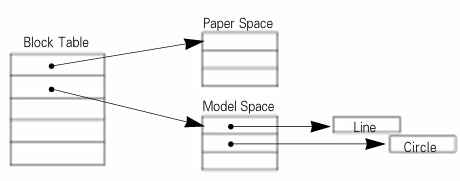
아래의 그림은 AutoCAD 데이터베이스의 핵심 구성요소를 표현한 것이다.

다음은 9개의 SymbolTable의 나열이다.
- Block Table(AcDbBlockTable Class)
- Dimension Table(AcDbDimensionTable Class)
- Layer Table(AcDblayerTable Class)
- Linetype Table(AcDbLinetypeTable Class)
- Registered Application Table(AcDbRegAppTable Class)
- Text Style Table(AcDbTextStyleTable Class)
- User Coordinate System Table(AcDbUCSTable Class)
- Viewport Table(AcDbViewportTable Class)
- View Table(AcDbViewTable Class)
객체 생성
이번에는 사용자가 아래와 같은 명령어를 입력하여 엔티티를 그렸을 때 데이터베이스에 어떻게 등록이 되는지 알아보자. 먼저, 아래와 같은 명령어를 입력하여 모델 영역(Model Space)에 선을 생성한다고 가정한다.
Command: line
Line 첫 번째 점 지정 : 4,2
Line 다음 점 지정 또는 [명령 취소(U)] : 10, 7

아래의 소스는 위 그림에서 선을 생성하여 모델 영역에 추가하는 예를 설명한다.
AcDbObjectId createLine()
{
    AcGePoint3d startPt(4.0, 2.0, 0.0);
    AcGePoint3d endPt(10.0, 7.0, 0.0);
    AcDbLine *pLine = new AcDbLine(startPt, endPt);

    AcDbBlockTable *pBlockTable;
    Acad::ErrorStatus es = acdbHostApplicationServices()->workingDatabase()->getSymbolTable(pBlockTable,
    AcDb::kForRead);
    if (es != Acad::eOk)
    	return AcDbObjectId();

    AcDbBlockTableRecord *pBlockTableRecord;
    pBlockTable->getAt(ACDB_MODEL_SPACE, pBlockTableRecord, AcDb::kForWrite);
    pBlockTable->close();

    AcDbObjectId lineId;
    pBlockTableRecord->appendAcDbEntity(lineId, pLine);
    pBlockTableRecord->close();
    pLine->close();

    return lineId;
}
Command: circle 9,3 2(반지름)
AcDbObjectId createCircle()
{
    AcGePoint3d center(9.0, 3.0, 0.0);
    AcGeVector3d normal(0.0, 0.0, 1.0);
    AcDbCircle *pCirc = new AcDbCircle(center, normal, 2.0);
    AcDbBlockTable *pBlockTable;
    acdbHostApplicationServices()->workingDatabase()
        ->getSymbolTable(pBlockTable, AcDb::kForRead);
    AcDbBlockTableRecord *pBlockTableRecord;
    pBlockTable->getAt(ACDB_MODEL_SPACE, pBlockTableRecord,
        AcDb::kForWrite);
    pBlockTable->close();
    AcDbObjectId circleId;
    pBlockTableRecord->appendAcDbEntity(circleId, pCirc);
    pBlockTableRecord->close();
    pCirc->close();
    return circleId;
}
이번에는 새로운 그룹(Group)을 생성해 보기로 한다. Group 객체는 대표적인 비그래픽 객체로 Group Dictionary에 선택된 객체들의 정보들을 저장하여 그룹으로 묶어주는 역할을 한다.
Command: group

void createGroup(AcDbObjectIdArray& objIds, char* pGroupName)
{
    AcDbGroup *pGroup = new AcDbGroup(pGroupName);
    // Put the group in the group dictionary which resides
    // in the named object dictionary.
    //
    AcDbDictionary *pGroupDict;
    acdbHostApplicationServices()->workingDatabase()
        ->getGroupDictionary(pGroupDict, AcDb::kForWrite);
    AcDbObjectId pGroupId;
    pGroupDict->setAt(pGroupName, pGroup, pGroupId);
    pGroupDict->close();
    // Now that the group has been added, it has an ObjectID.
    // This is important since the group will become a persistent
    // reactor for the added entities...
    for (int i = 0; i < objIds.length(); i++)
        pGroup->append(objIds[i]);

    pGroup->close();
}Handle & Object ID
오토캐드 데이터베이스에서 Handle과 Object ID는 중요한 개념 중의 하나이다. AcDbEntity에서 상속 받은 모든 객체는 Model Space에 등록이 되어야 비로소 Object ID를 부여 받게 된다. Model Space에 등록하지 않으면 임시 객체이며 Object ID가 없다. 따라서, ObjectID가 있는 그래픽 객체는 데이터베이스에서 관리가 된다. 그렇다면 Handle과 ObjectID의 차이는 무엇일까?
데이터베이스에 저장된 객체가 DWG 파일에 저장 될 때는 객체의 고유한 식별자로 저장된다. 이 값을 Handle이라고 부른다. 이 파일이 다시 Open될 때 ADS는 데이터베이스를 만들고 저장된 Handle 객체를 고유한 Object ID로 만든다. 아래 그림은 Handle과 Object ID의 변환 과정이다.

Extended Data & Extension Dictionary
마지막으로 오토캐드 화면상에 보이지 않는 Extended Data와 Extension Dictionary에 대해 알아 보기로 한다.
먼저, eXtended Data는 AutoCAD에서 Entity에 16Kbyte 이하의 데이터를 추가로 붙여서 저장할 수 있는 resbuf들의 연결 리스트이다. AutoCAD는 이 정보를 유지 관리하지만 직접 사용하지는 않는다. resbuf 데이터는 1000 ~ 1071 범위의 DXF 그룹 코드를 사용한다. 다음은 XData를 가져오고 설정하는 간단한 활용 코드 예제이다.
객체에 설정된 Extended Data (보통 XData라고 부름)를 출력하는 예제 코드
void printXdata()
{
    // Select and open an object.
    //
    AcDbObject *pObj;
    if ((pObj = selectObject(AcDb::kForRead)) == NULL) {
        return;
    }
    // Get the application name for the xdata.
    //
    char appname[133];
    if (acedGetString(NULL,
        "\nEnter the desired Xdata application name: ",
        appname) != RTNORM)
    {
        return;
    }
    // Get the xdata for the application name.
    //
    struct resbuf *pRb;
    pRb = pObj->xData(appname);
    if (pRb != NULL) {
        // Print the existing xdata if any is present.
        // Notice that there is no -3 group, as there is in
        // LISP. This is ONLY the xdata, so
        // the -3 xdata-start marker isn't needed.
        //
        printList(pRb);
        acutRelRb(pRb);
    } else {
        acutPrintf("\nNo xdata for this appname");
    }
    pObj->close();
}
객체에 XData를 저장하는 예제 코드
void addXdata()
{
    AcDbObject* pObj = selectObject(AcDb::kForRead);
    if (!pObj) {
        acutPrintf("Error selecting object\n");
        return;
    }
    // Get the application name and string to be added to
    // xdata.
    //
    char appName[132], resString[200];
    appName[0] = resString[0] = '\0';
    acedGetString(NULL, "Enter application name: ",
        appName);
    acedGetString(NULL, "Enter string to be added: ",
        resString);
    struct  resbuf  *pRb, *pTemp;
    pRb = pObj->xData(appName);
    if (pRb != NULL) {
        // If xdata is present, then walk to the
        // end of the list.
        //
        for (pTemp = pRb; pTemp->rbnext != NULL;
                pTemp = pTemp->rbnext)
                { ; }
    } else {
        // If xdata is not present, register the application
        // and add appName to the first resbuf in the list.
        // Notice that there is no -3 group as there is in
        // AutoLISP. This is ONLY the xdata so
        // the -3 xdata-start marker isn't needed.
        //
        acdbRegApp(appName);
        pRb = acutNewRb(AcDb::kDxfRegAppName);
        pTemp = pRb;
        pTemp->resval.rstring
            = (char*) malloc(strlen(appName) + 1);
        strcpy(pTemp->resval.rstring, appName);
    }
    // Add user-specified string to the xdata.
    //
    pTemp->rbnext = acutNewRb(AcDb::kDxfXdAsciiString);
    pTemp = pTemp->rbnext;
    pTemp->resval.rstring
        = (char*) malloc(strlen(resString) + 1);
    strcpy(pTemp->resval.rstring, resString);
    // The following code shows the use of upgradeOpen()
    // to change the entity from read to write.
    //
    pObj->upgradeOpen();
    pObj->setXData(pRb);
    pObj->close();
    acutRelRb(pRb);
}
다음은 Extension Dictionary이다. 모든 객체는 하나의 Extension Dictionary를 가진다. Extension Dictionary는 XData와 다르게 제한된 용량없이 객체에 데이터를 임의로 추가할 수 있다. Extension Dictionary는 AcDbXrecord 객체 형태로 데이터를 추가할 수 있으며, resbuf 형태의 Chain을 구성하여 저장한다. resbuf 체인은 DXF 그룹 코드 1 ~ 369까지의 그룹 코드를 사용하여 정의한다.
또한, Xrecord가 수정될 때 Notify는 전송되지 않고 ObjectARX 응용 프로그램이 Xrecord가 수정되었을 때 알아야 하는 경우, ObjectReactor와 같은 자체적으로 Notify를 보내야 한다.
void createXrecord()
{
    AcDbDictionary *pNamedobj, *pDict;
    acdbHostApplicationServices()->workingDatabase()
        ->getNamedObjectsDictionary(pNamedobj, AcDb::kForWrite);
    // Check to see if the dictionary we want to create is
    // already present. If not, then create it and add
    // it to the named object dictionary.
    //
    if (pNamedobj->getAt("ASDK_DICT", (AcDbObject*&) pDict,
        AcDb::kForWrite) == Acad::eKeyNotFound)
    {
        pDict = new AcDbDictionary;
        AcDbObjectId DictId;
        pNamedobj->setAt("ASDK_DICT", pDict, DictId);
    }
    pNamedobj->close();
    // Add a new xrecord to the ASDK_DICT dictionary.
    //
    AcDbXrecord *pXrec = new AcDbXrecord;
    AcDbObjectId xrecObjId;
    pDict->setAt("XREC1", pXrec, xrecObjId);
    pDict->close();
    // Create a resbuf list to add to the xrecord.
    //
    struct resbuf *pHead;
    ads_point testpt = {1.0, 2.0, 0.0};
    pHead = acutBuildList(AcDb::kDxfText,
        "This is a test Xrecord list",
        AcDb::kDxfXCoord, testpt,
        AcDb::kDxfReal, 3.14159,
        AcDb::kDxfAngle, 3.14159,
        AcDb::kDxfColor, 1,
        AcDb::kDxfInt16, 180,
        0);
    // Add the data list to the xrecord.  Notice that this
    // member function takes a reference to resbuf, NOT a
    // pointer to resbuf, so you must dereference the
    // pointer before sending it.
    //
    pXrec->setFromRbChain(*pHead);
    acutRelRb(pHead);
    pXrec->close();
}
// Gets the xrecord associated with the key XREC1 and
// lists out its contents by passing the resbuf list to the
// function printList.
//
void listXrecord()
{
    AcDbDictionary *pNamedobj;
    acdbHostApplicationServices()->workingDatabase()
        ->getNamedObjectsDictionary(pNamedobj, AcDb::kForRead);
    // Get the dictionary object associated with the key ASDK_DICT.
    //
    AcDbDictionary *pDict;
    pNamedobj->getAt("ASDK_DICT", (AcDbObject*&)pDict,
        AcDb::kForRead);
    pNamedobj->close();
    // Get the xrecord associated with the key XREC1.
    //
    AcDbXrecord *pXrec;
    pDict->getAt("XREC1", (AcDbObject*&) pXrec,
        AcDb::kForRead);
    pDict->close();
    struct resbuf *pRbList;
    pXrec->rbChain(&pRbList);
    pXrec->close();
    printList(pRbList);
  acutRelRb(pRbList);
}'ObjectARX 강좌' 카테고리의 다른 글
| [ObjectARX] 6. Dictionary (0) | 2026.03.27 |
|---|---|
| [ObjectARX] 5. GS Marker (0) | 2026.03.23 |
| [ObjectARX] 4. Symbol Table (0) | 2026.03.22 |
| [ObjectARX] 3. Entity (0) | 2026.03.21 |
| [ObjectARX] 1. ObjectARX 소개 (2) | 2026.03.18 |